
What is the primary function of a basketball scoreboard? The primary function of a basketball scoreboard is to accurately and clearly display essential game information to players, referees, coaches, and spectators. This includes the current score, the remaining game time, the period of play, team fouls, and timeouts.
Can I operate a scoreboard without prior experience? Yes, with clear instructions and a bit of practice, most individuals can learn to operate a basketball scoreboard, especially with modern electronic systems.
Who is typically responsible for operating the scoreboard? The responsibility of operating the scoreboard typically falls to a designated scorekeeper, who may be a volunteer, a student, a league official, or a paid employee.
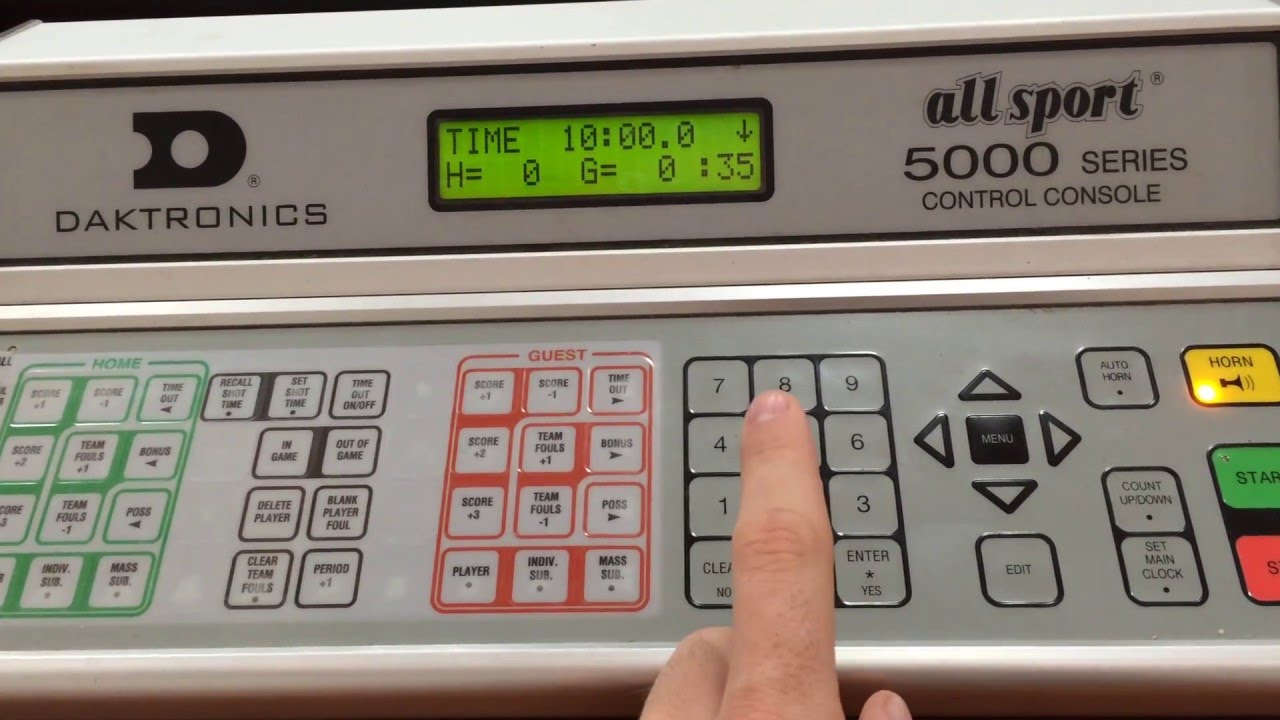
Image Source: i.ytimg.com
Getting Ready for Game Day: Scoreboard Essentials
Game day is when all the preparation pays off! Having a functioning and well-operated scoreboard is crucial for a smooth and enjoyable basketball experience. Whether you’re dealing with a gleaming electronic scoreboard operation or a classic manual scoreboard, the goal remains the same: clear communication of game status. This guide will walk you through the process, from pre-game checks to the final buzzer.
Pre-Game Checks: Ensuring Everything is Ready
Before the teams even step onto the court, a thorough check of the scoreboard is vital. This prevents mid-game hiccups and ensures all information is displayed correctly.
Powering Up and Basic Functionality
- Check Power Source: Ensure the scoreboard is properly plugged in or that batteries are charged and correctly installed. For wired systems, verify the connection to the power outlet.
- System Initialization: Turn on the scoreboard according to the manufacturer’s instructions. Most electronic systems will go through a self-test sequence.
- Display Verification: Confirm that all segments of the scoreboard display are working. Check digits for each scoring position, the game clock, and any auxiliary displays like shot clocks or period indicators.
- Button Responsiveness: Press each button on the control console to ensure it registers input. Listen for any audible feedback (beeps) or visual confirmation on the display.
Setting the Initial Game State
- Score Reset: Ensure both team scores are set to zero.
- Game Clock Reset: The basketball game clock should be set to the regulation start time for the period (e.g., 12 minutes for a college game, 10 minutes for high school).
- Period Setting: Set the current period to “1” (or the appropriate starting period).
- Foul Count Reset: Verify that team foul counters are reset to zero.
- Timeout Counters Reset: Ensure each team’s timeout indicators are cleared.
Understanding the Control Console: Your Command Center
The control console is where you’ll manage all the information displayed. Familiarizing yourself with its layout and functions is key to effective basketball scorekeeping.
Common Buttons and Their Functions
- Score Entry: Buttons for incrementing the score for each team (e.g., “+1,” “+2,” “+3”). Some consoles may have dedicated buttons for adding specific point values.
- Game Clock Control:
- Start/Stop: To begin and pause the basketball timing.
- Reset: To set the clock back to its initial value.
- Advance/Set: To manually set the clock to a specific time.
- Period Control: Buttons to advance the period (e.g., “Next Period,” “+1”).
- Foul Buttons: Buttons to increment team fouls. Some systems might have separate buttons for home and visiting team fouls.
- Timeout Buttons: Buttons to record timeouts for each team. These often correspond to visual indicators on the scoreboard.
- Possession Arrow: For electronic scoreboards, there might be a button to toggle the possession arrow on the display.
Working with a Manual Scoreboard: The Classic Approach
While less common in professional settings today, many recreational leagues and smaller venues still utilize manual scoreboards. These require a different skillset but are just as important for basketball game rules adherence.
Types of Manual Scoreboards
- Flip Numbers: These scoreboards have rotating numbers that are manually flipped to show the score and time.
- Sliding Numbers: Numbers are physically slid into place to indicate the score.
- Pegboards: Score is kept on a board with pegs, often in designated scoring areas.
Manual Scorekeeping Essentials
- Dedicated Scorekeeper: One person should be solely responsible for accurately recording the score.
- Clear Communication: The scorekeeper needs to be in direct communication with the scorer’s table and potentially the referees to confirm calls.
- Marking Increments: Keep a separate sheet or use a marker to track each point scored and by whom, to ensure accurate score updates.
- Time Management: A reliable stopwatch or game clock is essential for manual timing. The scorekeeper must be diligent about starting and stopping the clock accurately.
During the Game: Keeping Pace with the Action
The game is underway, and your role as scorekeeper is dynamic. You’re not just pressing buttons; you’re actively participating in the flow of the game through accurate basketball timing and scorekeeping.
Tracking the Score Accurately
This is the most fundamental aspect of basketball scorekeeping. Every basket, free throw, and penalty needs to be reflected on the scoreboard promptly and correctly.
Point Values
- Free Throws: Award 1 point.
- Field Goals Inside the Arc: Award 2 points.
- Field Goals Outside the Arc: Award 3 points.
Recording Fouls
- Team Fouls: Each time a player commits a foul, the team foul counter must be incremented. This is crucial for understanding when a team is in the “bonus” situation.
- Personal Fouls: While the scoreboard typically tracks team fouls, it’s good practice for the scorekeeper to also keep a mental or written note of individual player fouls, especially as they approach disqualification.
Managing the Basketball Game Clock
The basketball game clock is a critical element. Proper management ensures that the game adheres to the official basketball game rules and is fair to both teams.
Starting and Stopping the Clock
The clock should be stopped in the following situations:
- Fouls: When a foul is called.
- Timeouts: When a timeout is requested and granted.
- Substitutions: When a substitute enters the game.
- Violations: For certain violations like traveling or double dribble, depending on the specific rules and level of play.
- Out of Bounds: When the ball goes out of bounds.
- Injuries: When a player is injured and play is stopped.
The clock should be started when:
- Live Ball: The ball is legally touched by an offensive player on a throw-in.
- Free Throws: The ball is touched by an offensive player after the last free throw.
Shot Clock Operation (If Applicable)
Many games, especially at higher levels, include a shot clock. This is a separate timer that starts when a team gains possession of the ball and resets when the ball hits the rim.
- Resetting the Shot Clock: The shot clock should be reset to its designated time (e.g., 24 or 30 seconds) whenever the ball hits the rim on a shot attempt or when possession changes.
- Horn/Signal: The shot clock usually has an audible signal when time expires.
Timeouts and Substitutions: Keeping Track of Resets
- Timeout Management: When a timeout is called, press the timeout button for the requesting team. Note how many timeouts each team has remaining.
- Substitution Procedure: When a substitution is made, ensure the game clock is stopped. The incoming player can only enter the game when the clock is stopped and the referee signals for them to do so.
Handling Referee Signals and Communication
Effective basketball scorekeeping requires keen observation and communication with the referees.
- Visual Confirmation: Referees will often use hand signals to indicate fouls, violations, or out-of-bounds plays. Familiarize yourself with these signals.
- Clarification: If you are unsure about a call, a discreet signal or nod to the nearest referee can help clarify. Avoid prolonged discussions.
- Referee Signals Chart: Having a chart of common referee signals visible at the scorer’s table can be very helpful.
Post-Game Procedures: Wrapping Up Your Responsibilities
The final buzzer has sounded, and the game is over. Your job isn’t quite done yet. Proper post-game procedures ensure that all records are accurate.
Final Score Verification
- Confirm Scores: Verbally confirm the final score with the referees and coaches.
- Score Sheet Signature: If a physical score sheet is used, ensure it is signed by the scorer and the officials, validating the recorded information.
Resetting for the Next Game
- Clear All Data: Reset the scoreboard to zero for all categories (score, time, fouls, timeouts) to prepare it for the next contest.
- Power Down (If Necessary): If instructed, power down the scoreboard to conserve energy.
Advanced Scoreboard Functions and Considerations
Beyond the basics, some scoreboards offer more advanced features that can enhance the game experience and provide valuable data.
Incorporating Basketball Stats Tracking
Modern electronic scoreboards often integrate with basketball stats tracking systems. This can involve:
- Player Foul Tracking: Some systems allow for individual player foul tracking directly from the console.
- Individual Scoring: Inputting points directly to specific players.
- Timeouts per Player: Tracking player-specific timeouts or substitutions.
Utilizing the Full Scoreboard Display
The scoreboard display is more than just numbers. It’s a communication tool.
- Player Numbers: Some advanced systems can display player numbers when fouls are recorded.
- Timeout Indicators: Visual cues for remaining timeouts.
- Possession Indicator: A clear indication of which team has possession.
Working with Different Scoreboard Types
The principles of basketball scorekeeping remain consistent, but the execution can vary depending on the type of scoreboard you’re using.
Electronic Scoreboard Operation
Electronic scoreboards are the norm in most organized leagues. They offer precision and ease of use once you’re familiar with the controls.
Console Layouts
- Integrated Systems: All controls are on a single unit.
- Separate Keypads: Some systems use a wireless keypad that communicates with the scoreboard.
Software and Connectivity
- App-Based Control: Newer systems may be controlled via tablet or smartphone apps.
- Data Export: Advanced systems can export game data for statistical analysis.
Manual Scoreboard Operation
Operating a manual scoreboard requires more physical effort and constant attention.
Advantages of Manual Scoreboards
- Simplicity: Fewer moving parts, less prone to electronic failure.
- Visibility: Large, clear numbers can be seen from a distance.
Disadvantages of Manual Scoreboards
- Labor Intensive: Requires continuous physical effort to update.
- Potential for Errors: Human error can lead to score discrepancies.
- Limited Information: Typically only displays score and time.
Ensuring Accurate Basketball Timing
Precise basketball timing is a cornerstone of fair play. The scorekeeper is the guardian of the game’s clock.
Common Timing Errors and How to Avoid Them
- Stopping the Clock Late: Always be ready to hit the stop button the moment a stoppage is signaled or occurs.
- Starting the Clock Early: Wait for the ball to be legally touched inbounds before starting the clock after a stoppage.
- Incorrect Reset: Double-check that the clock is reset to the correct duration for each period.
Scorekeeping for Different Levels of Play
The nuances of basketball scorekeeping can differ slightly based on the league or age group.
Youth Leagues vs. Professional Leagues
- Foul Rules: Bonus situations and personal foul limits can vary.
- Game Length: Periods and quarter lengths differ significantly.
- Timeout Rules: The number and length of timeouts can vary.
Understanding Basketball Game Rules
A solid grasp of basketball game rules is paramount for a scorekeeper. This includes:
- Bonus Situations: When a team is in the bonus (e.g., after 5 team fouls in a quarter), free throws are awarded on non-shooting fouls.
- Shot Clock Resets: Knowing when the shot clock needs to be reset is crucial.
- Player Fouls: Awareness of player disqualification (e.g., after 5 or 6 personal fouls).
Maintaining Scorekeeping Essentials
Beyond the scoreboard itself, a few other items are essential for a smooth operation.
- Score Sheet: A physical score sheet is often a requirement for official record-keeping.
- Pens/Pencils: Multiple writing instruments.
- Clipboard: For easy writing.
- Team Rosters: To easily identify players by number.
- Rule Book: A quick reference for specific game situations.
Frequently Asked Questions (FAQ)
Q1: What is the maximum number of points that can be displayed on a typical basketball scoreboard?
A1: Most scoreboards can display scores up to 99 or 999 for each team, depending on the model.
Q2: Can I use a smartphone app to control any basketball scoreboard?
A2: Only specific modern electronic scoreboards are designed to be controlled by smartphone apps. You’ll need to check the scoreboard’s compatibility.
Q3: How do I handle a situation where the scoreboard malfunctions mid-game?
A3: Immediately notify the referees and game officials. They will determine the best course of action, which may involve using a manual backup or stopping the game.
Q4: Who is responsible for calling fouls?
A4: Fouls are called by the referees on the court, not the scorekeeper. The scorekeeper’s role is to record the fouls as signaled by the referees.
Q5: What are the most common referee signals I should know?
A5: Essential signals include those for fouls (personal, technical), violations (traveling, double dribble, out of bounds), and the direction of play or possession.
By following these guidelines, you’ll be well-equipped to handle your duties as a scorekeeper, ensuring accurate basketball scorekeeping, precise basketball timing, and a professional presentation of the scoreboard display for every game. Your role is vital to the integrity and enjoyment of the basketball experience.