
A basketball scoreboard is the central hub for all the vital information during a game. It tells players, coaches, and fans the score, the time left, and who has committed fouls. Can you work a basketball scoreboard with just a little practice? Absolutely! This guide will break down everything you need to know to operate a basketball scoreboard confidently, from the basic functions to the nuances of a digital basketball scoreboard guide. We’ll cover how to read a basketball score, how to manage the basketball game clock, and the importance of the buzzer system basketball.
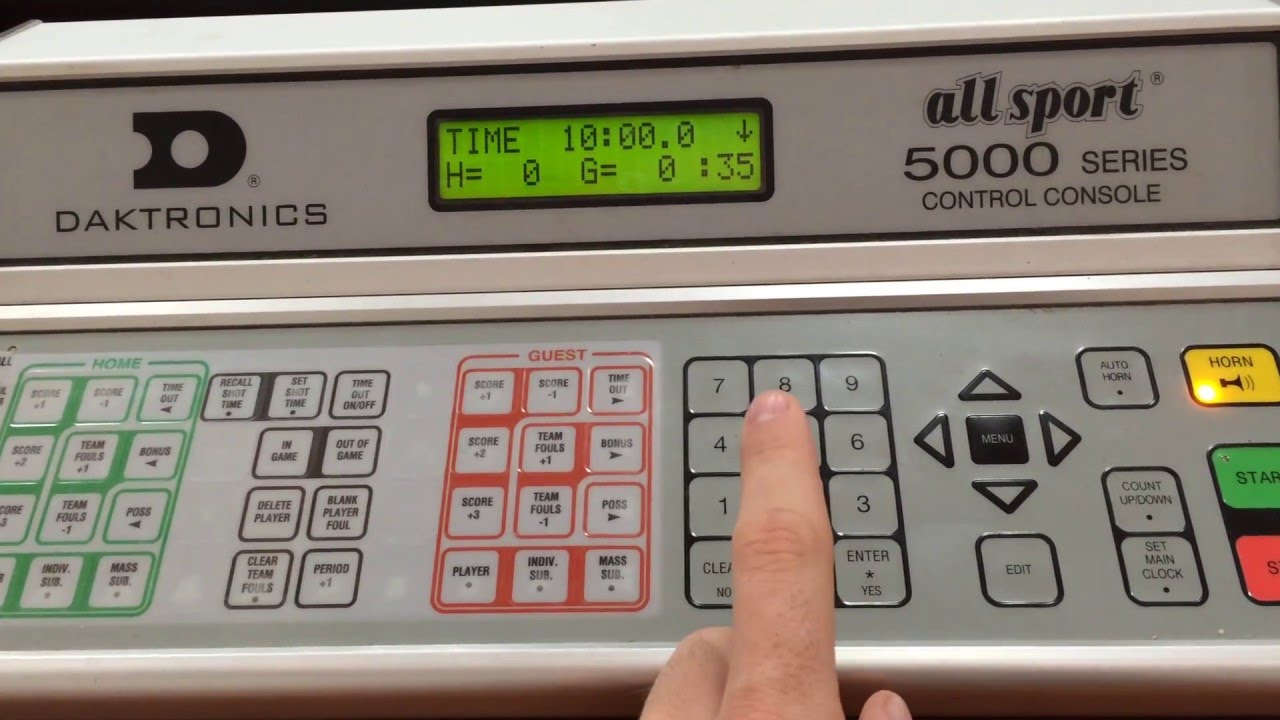
Image Source: i.ytimg.com
Grasping the Scoreboard’s Core Functions
At its heart, a basketball scoreboard is designed to convey key game information clearly and instantly. Think of it as the official scorekeeper, but with lights and numbers!
The Score Display: More Than Just Numbers
The most obvious part of any basketball score display is the score itself. This is typically presented in two large digits for each team.
- Home Team Score: Usually displayed on the left side of the scoreboard.
- Visitor Team Score: Usually displayed on the right side of the scoreboard.
Each point scored in basketball (2 points for a regular basket, 3 points for a shot beyond the arc, and 1 point for a free throw) is added to the respective team’s total.
The Basketball Game Clock: The Pulse of the Game
The basketball game clock is critical for regulating play. It shows how much time is remaining in the current quarter or period.
- Format: Most basketball game clocks display time in minutes and seconds, counting down from the starting time.
- Starting and Stopping: The clock operator must be quick to start the clock when the ball is legally put into play (usually by a player on the court) and stop it when play is dead (e.g., after a whistle, a made basket in certain situations, or when the ball goes out of bounds). This is a key aspect of operating a basketball scoreboard.
Period/Quarter Indicator: Keeping Track of Game Flow
This part of the scoreboard tells everyone which period of the game is currently being played.
- Common Indicators: This might be a number (1, 2, 3, 4 for quarters) or a word (1st, 2nd, Half).
- Progression: The indicator advances automatically or is manually changed by the operator after each period concludes.
Foul Counts: A Necessary Detail
Keeping track of fouls is another crucial responsibility of operating a basketball scoreboard.
- Team Fouls: Most scoreboards show the number of team fouls committed by each team. This is important for knowing when a team is in the “bonus” situation, where the opposing team gets free throws for fouls committed.
- Player Fouls: Some advanced scoreboards or dedicated displays will show individual player foul counts. This helps coaches manage their players’ time on the court.
Operating a Basketball Scoreboard: The Mechanics
Whether you’re dealing with a manual basketball scoreboard or a state-of-the-art digital basketball scoreboard guide, the basic principles of operation remain similar.
The Control Panel: Your Command Center
Every scoreboard has a control panel. This can range from a simple set of buttons and switches to a sophisticated console with a touchscreen.
- Familiarizing Yourself: Before a game, take time to look at the control panel. Identify buttons for scoring, starting/stopping the clock, advancing periods, and resetting.
- Power: Ensure the scoreboard is properly powered on before the game begins.
Starting and Stopping the Game Clock: The Art of Timing
This is arguably the most dynamic part of operating a basketball scoreboard. Precision is key.
- Common Scenarios for Starting the Clock:
- When the ball is touched by a player on the court after a throw-in.
- When a player legally touches the ball after a free throw attempt.
- Common Scenarios for Stopping the Clock:
- When a whistle blows for a foul or violation.
- When the ball goes out of bounds.
- After a made basket (depending on the league rules).
- When a timeout is called.
- After an unsuccessful free throw that is not the last one.
Adding Points: Accuracy is Paramount
Adding points needs to be done as soon as the score is confirmed.
- Two-Point Baskets: A single button press for “2 points” for the correct team.
- Three-Point Baskets: A separate button for “3 points” for the correct team.
- Free Throws: Usually, free throws are added one at a time. If a player makes two free throws, the operator must press the “1 point” button twice for that team.
Managing Fouls: A Detailed Task
Keeping track of fouls requires diligent attention.
- Team Fouls: There will typically be buttons to increment the team foul count for each team. It’s vital to press these each time a foul is called on a team.
- Player Fouls: If your scoreboard tracks player fouls, you’ll need to identify the player who committed the foul and increment their personal foul count.
Period Advancement: Signalling the Next Stage
At the end of each period, the operator must signal the transition.
- Manual Advancement: On many manual basketball scoreboard systems, there will be a button to advance to the next period.
- Automatic Advancement: Some digital systems may advance automatically, but often require operator confirmation.
Resetting the Scoreboard: For the Next Game
After the game, the scoreboard needs to be cleared for future use.
- Full Reset: A button or sequence that clears all scores, fouls, and the clock to zero.
- Period Reset: Sometimes, only the clock needs to be reset to the starting time for a new quarter.
Digital Basketball Scoreboard Guide: Modern Features
Digital scoreboards offer more features and often a more intuitive interface.
The Digital Interface: Touchscreens and Keypads
Modern digital basketball scoreboard systems typically use a console with a touchscreen or a dedicated keypad with function keys.
- Touchscreen Advantages: Allows for direct interaction with displayed numbers and team names, making point and foul adjustments faster.
- Keypad Advantages: Can be more robust and easier to operate by feel, which can be useful in a fast-paced game.
Shot Clocks: Timing the Offense
Many digital scoreboards integrate or work in conjunction with separate shot clocks.
- Shot Clock Function: This clock counts down from 24 seconds (or a different specified time). It starts when a team gains possession of the ball and must be reset to the starting time by the operator after certain stoppages or when the shot clock expires.
- Operator Responsibility: The shot clock operator is often a separate person from the main scoreboard operator, but they work in tandem to ensure all timing aspects of the game are correctly managed.
Timeout Indicators: Visualizing Breaks
Digital scoreboards often have indicators for team timeouts.
- Timeout Tracking: There might be a dedicated section to track how many timeouts each team has remaining. When a coach calls a timeout, the operator marks it on the scoreboard.
Possession Arrows: Clarifying Who’s Next
Some digital scoreboards, especially those with more advanced features, might include a possession arrow.
- Arrow Function: This arrow indicates which team has possession of the ball according to the alternating possession rule (used after certain held balls).
Fathoming Basketball Scorekeeping: Essential Rules for Operators
A good scoreboard operator needs to have a basic grasp of basketball rules to apply them correctly to the display. This is a core part of understanding basketball scorekeeping.
When to Start and Stop the Clock: A Deeper Dive
- Clock Starts:
- On a throw-in: When a player on the court touches the ball.
- On a free throw: When the ball is touched by a player on the court after the last free throw attempt.
- Clock Stops:
- Fouls and Violations: Whistle blows.
- Out of Bounds: Ball goes out of bounds.
- Made Basket: In the last two minutes of the fourth quarter and in any overtime period, the clock stops after a made field goal. In earlier periods, the clock typically continues to run unless it’s a dead ball situation like a foul during the act of shooting.
- Timeouts: Called by a coach or official.
- Substitutions: When the ball is dead and an official signals for a substitution.
Foul Situations: The Bonus and Beyond
- Team Fouls: Leagues typically have a rule where after a certain number of team fouls in a period (e.g., 5 fouls), the opposing team is awarded free throws for any subsequent fouls, even non-shooting fouls. This is called the “bonus” or “double bonus.” The scoreboard operator needs to track these team fouls diligently.
- Player Fouls: Players are usually disqualified after committing a certain number of personal fouls (e.g., 5 or 6). The scoreboard operator needs to keep track of each player’s fouls.
Scoring Scenarios: Free Throws and Technicals
- Free Throws: Awarded for fouls, technical fouls, and certain violations. Each made free throw counts as one point.
- Technical Fouls: These are fouls called for unsportsmanlike conduct, certain violations of the rules, etc. They typically result in free throws for the opposing team and possession of the ball. The points from technical free throws are added to the score, and the foul is typically added to the team’s foul count.
The Buzzer System Basketball: Signaling the End
The buzzer is an integral part of the basketball game, often linked to the scoreboard.
When the Buzzer Sounds
- End of Period: The primary use is to signal the end of a quarter or half.
- Shot Clock Violation: An audible signal often accompanies the shot clock visually expiring.
- Game End: A distinct buzzer sound might indicate the final buzzer of the game.
Buzzer System Reliability
A reliable buzzer system is crucial for the smooth flow of the game. If the scoreboard is controlled manually, the operator will often press a button to activate the buzzer at the appropriate times. In more automated systems, the buzzer might be tied directly to the game clock or shot clock.
How to Read a Basketball Score: For Spectators and Operators
Deciphering a basketball score is straightforward once you know the basics.
- Largest Numbers: These represent the total points scored by each team.
- Clock: Shows the remaining time in the current period.
- Period/Quarter: Indicates which part of the game you are in.
- Fouls: The smaller numbers usually indicate team fouls.
Basketball Game Management: The Scoreboard’s Role
The scoreboard is a vital tool in overall basketball game management.
- Information Hub: It provides essential information that guides decisions for players, coaches, and officials.
- Fair Play: Accurate scorekeeping and clock management contribute to fair play.
- Pacing the Game: The game clock dictates the pace of the game.
- Communication: It’s the primary communication tool for game status to everyone present.
Working with Different Scoreboard Types
Manual Basketball Scoreboard
These are older but still functional systems. They often involve physical buttons, levers, or dials.
- Pros: Generally simpler to understand the basic functions.
- Cons: Can be slower to operate, less feature-rich, and prone to mechanical wear.
- Operation: You’ll typically press buttons to add points, increment fouls, and start/stop the clock. Advancing periods might involve turning a dial or pressing a specific sequence.
Digital Basketball Scoreboard
These are the modern standard, offering enhanced features and often wireless control.
- Pros: More features (shot clocks, timeout tracking), often wireless, can be more accurate and easier to update.
- Cons: Can have a steeper learning curve for complex functions, require more technical setup.
- Operation: Usually controlled via a console with a keypad or touchscreen. Many come with detailed manuals (a digital basketball scoreboard guide is essential).
Practical Tips for Scoreboard Operators
- Know Your Equipment: Before the game, spend time with the specific scoreboard you’ll be operating. Read the manual if available.
- Practice: If possible, practice operating the scoreboard with a friend before a real game. Simulate scoring, fouls, and clock stoppages.
- Communicate: Maintain clear communication with referees and the official scorer. They are the ultimate authority on game events.
- Stay Focused: It’s easy to get distracted, but your role is critical. Stay attentive to the game action and the corresponding signals from officials.
- Be Prepared for the Unexpected: Sometimes, equipment can malfunction. Know who to contact if there are issues.
- Learn Basic Rules: A basic knowledge of basketball rules will help you anticipate events and react quickly.
FAQ Section
Q1: What is the primary function of a basketball scoreboard?
A1: The primary function of a basketball scoreboard is to display the current score, the remaining game time, and relevant statistics like fouls and periods to players, coaches, and spectators.
Q2: Can I operate a basketball scoreboard without prior experience?
A2: Yes, with a bit of practice and by following a good guide, most individuals can learn to operate a basketball scoreboard. The basics are quite intuitive.
Q3: Who is responsible for starting and stopping the basketball game clock?
A3: The designated scoreboard operator is responsible for starting and stopping the basketball game clock according to the rules of the game and signals from the referees.
Q4: How do I keep track of team fouls on a basketball scoreboard?
A4: Most basketball scoreboards have dedicated buttons or controls to increment the team foul count. You press the appropriate button each time a team commits a foul.
Q5: What does the buzzer system basketball signify?
A5: The buzzer system basketball typically signals the end of a period, the expiration of the shot clock, or the end of the game itself.
Q6: How do I read a basketball score correctly?
A6: To read a basketball score, look for the large numbers indicating the points for each team, the game clock showing the time left, and the period indicator to know which part of the game you’re in.
Q7: What are the key basketball timer functions I need to know?
A7: The key basketball timer functions are starting the clock on an inbounds pass or free throw attempt, and stopping the clock for fouls, violations, timeouts, out-of-bounds plays, and certain made baskets.
Q8: Is there a difference between operating a manual and a digital basketball scoreboard?
A8: Yes, manual scoreboards often use physical buttons and dials, while digital scoreboards typically use touchscreens or keypads with more advanced features and sometimes wireless control.
Q9: What is involved in understanding basketball scorekeeping from an operator’s perspective?
A9: It involves accurately tracking points, fouls (both team and player), and time, and knowing when to start and stop the game clock based on game events and referee signals.
Q10: What is the role of the scoreboard in basketball game management?
A10: The scoreboard is central to basketball game management by providing crucial, real-time information that dictates the flow, timing, and fairness of the game.
This comprehensive guide should equip you with the foundational knowledge to confidently step up and operate a basketball scoreboard, ensuring a smooth and well-managed game for everyone involved.