
Operating a basketball scoreboard is crucial for a smooth and engaging game. A basketball scoreboard is an electronic device that displays the score, time remaining, and other relevant game information. This guide will walk you through the essential steps to effectively manage a basketball scoreboard, ensuring accurate game tracking and a great experience for players, coaches, and fans. We’ll cover everything from the basics of basketball scorekeeping to specific settings and advanced features.
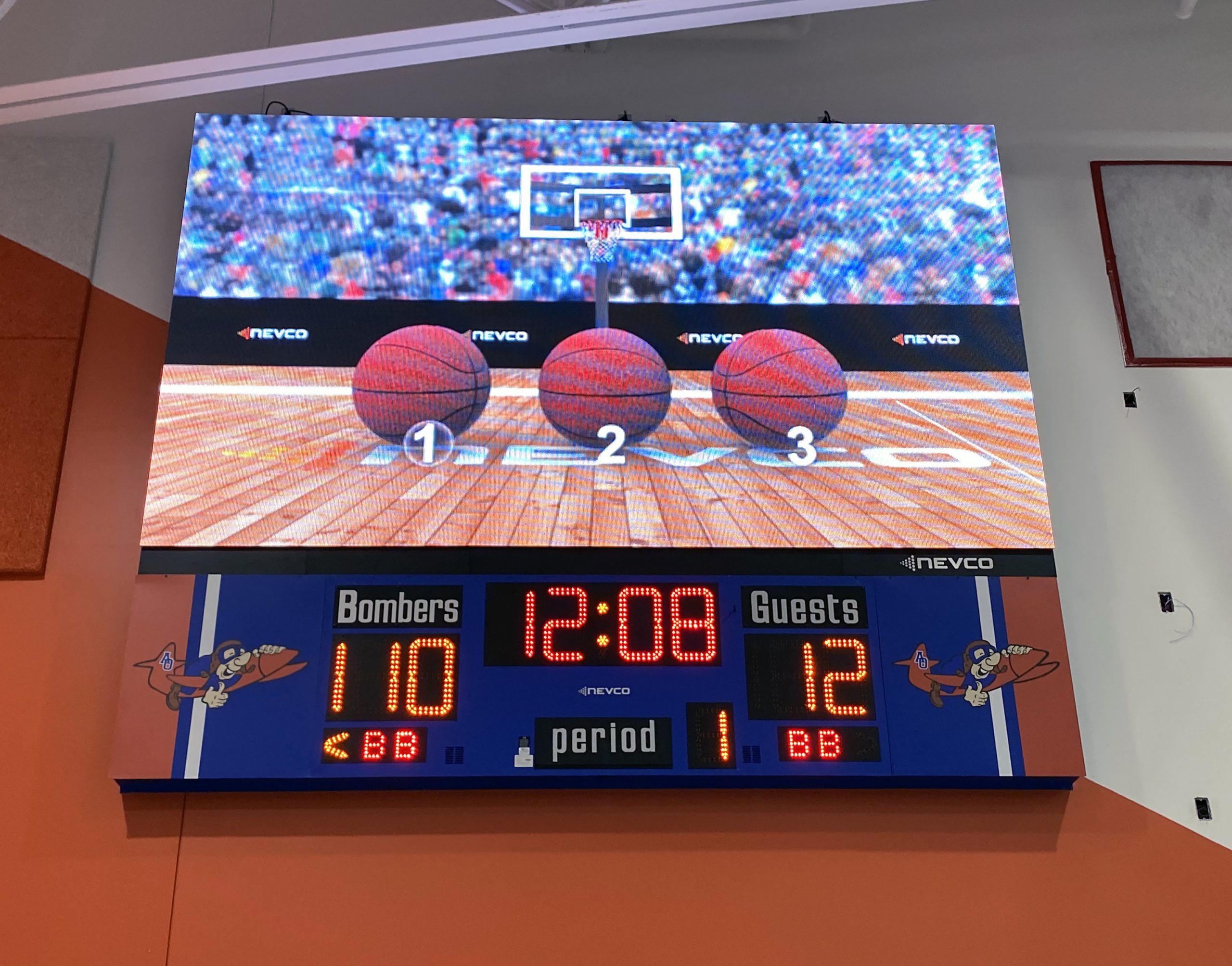
Image Source: www.nevco.com
Getting Started with Basketball Scoreboard Operation
Before the first whistle blows, it’s essential to be familiar with the specific scoreboard you’ll be using. While general principles apply, different models have unique layouts and functions. A solid grasp of basketball scoreboard operation means understanding the primary functions and how to interact with them efficiently.
Identifying Key Components of a Basketball Scoreboard
Most basketball scoreboards share common elements. Knowing what each part does is the first step in effective basketball game control.
- Score Display: Shows the current points for each team. Typically, there are two sets of digits, one for the home team and one for the visiting team.
- Game Clock: Displays the time remaining in the current period. This is a vital part of basketball clock management.
- Period Indicator: Shows which quarter or half of the game is currently being played.
- Possession Indicator: A small arrow or light showing which team has possession of the ball.
- Shot Clock: A separate clock that counts down the time a team has to shoot the ball once they gain possession. This is critical for basketball shot clock rules.
- Fouls: Displays the number of team fouls accumulated by each team.
- Timeouts: Indicates the number of timeouts remaining for each team.
- Player Information (Optional): Some advanced scoreboards can display player numbers, fouls, and points.
Basic Controls: The Foundation of Basketball Scorekeeping
The control panel is your command center. Understanding its layout is key to precise basketball scorekeeping.
- Score Buttons: Usually marked with “+” and “-” for each team, or dedicated buttons for adding 1, 2, or 3 points.
- Clock Controls: Start, Stop, Reset, and Period Advance buttons.
- Shot Clock Controls: Buttons to set and reset the shot clock.
- Foul/Timeout Buttons: Buttons to increment team fouls and timeouts.
- Horn/Buzzer: Activates the audible signal for game stoppages or end of periods.
Setting Up Your Basketball Scoreboard for a Game
How to set basketball scoreboard correctly before a game begins is paramount. This ensures all information is accurate from the tip-off.
Initializing the Scoreboard
- Power On: Locate the power button. This might be on the main unit, a remote control, or even a switch on the back.
- Reset: Before starting a new game, always reset all the displays to zero. This usually involves holding down a “Reset” or “Clear” button for a few seconds.
- Set Period: Input the current period. For the start of a game, this is typically “1st Quarter” or “1st Half.”
Configuring Game Time and Shot Clock
Accurate basketball clock management depends on setting these times correctly.
- Game Clock Duration: Enter the standard game time for the period (e.g., 10 minutes for a quarter, 20 minutes for a half).
- Shot Clock Duration: Set the standard shot clock time (e.g., 24 seconds). This is a crucial element of using a basketball scoreboard according to modern rules.
Operating the Scoreboard During Gameplay
Mastering basketball scoreboard operation involves seamless transitions and accurate updates throughout the game.
Starting and Stopping the Game Clock
- Start: When the ball is legally put into play (tip-off or inbound pass), press the “Start” button for the game clock.
- Stop: Immediately when the whistle blows for a foul, out-of-bounds, or any other stoppage, press the “Stop” button. Precision here is key to good basketball game control.
Updating Scores
- Scoring Events: Each time a team scores, press the appropriate score button (e.g., “+2” for a regular basket, “+3” for a three-pointer, “+1” for a free throw). Ensure you are using a basketball scoreboard to reflect the actual points awarded.
- Confirmations: It’s good practice for the scorekeeper to verbally confirm the score with the referee after a scoring play, especially if there’s any confusion.
Managing the Shot Clock
The basketball shot clock requires constant attention.
- Starting the Shot Clock: When a new possession begins, and the ball is touched by a player in bounds, activate the shot clock. This is typically done with a dedicated “Shot Clock Start” button.
- Resetting the Shot Clock: The shot clock resets to its original duration (e.g., 24 seconds) whenever the ball hits the rim or goes through the basket. It also resets if a foul occurs that stops play. There are usually specific buttons for this.
- 24-Second Horn: Be aware that the shot clock often has its own audible signal. This horn should sound immediately when the time expires.
Tracking Fouls and Timeouts
Accurate recording of fouls and timeouts is essential for basketball scorekeeping.
- Team Fouls: When a foul is called against a team, press the designated button to increment their team foul count. Many scoreboards will visually indicate when a team reaches the bonus.
- Personal Fouls (Advanced Scoreboards): If the scoreboard tracks individual player fouls, you’ll need to know the player’s number and the type of foul to input it correctly.
- Timeouts: When a team calls a timeout, press the “Timeout” button for that team. The basketball score display will then show one fewer timeout available. Make sure to note which team called the timeout.
Advancing Periods and Game End
- End of Period: When the game clock reaches 0:00, the period ends. If the clock was stopped, pressing the “Period Advance” button will typically reset the game clock to the start of the next period and advance the period indicator.
- End of Game: After the final period ends, the scoreboard will show the final score.
Advanced Features and Settings on a Basketball Scoreboard
Modern scoreboards offer more than just basic scoring. Exploring the basketball scoreboard settings can enhance the game experience.
Customizing Displays
Many scoreboards allow for customization of the basketball score display. This might include:
- Team Names: Some systems let you input team names or abbreviations.
- Logos: Higher-end boards can display team logos.
- Colors: The color of digits or backlighting can often be changed.
Player Statistics Tracking
If your scoreboard supports player statistics, you’ll need to learn how to input:
- Player Number: The number of the player involved in the action.
- Points: Assigning points to the correct player.
- Fouls: Tracking individual player fouls.
- Timeouts (Individual): Some systems track player-called timeouts.
Table 1: Common Scoreboard Data Input
| Action | Button/Input Type | Associated Data |
|---|---|---|
| Score Basket | Numeric Keypad/+/- | Points (1, 2, 3) |
| Foul | Team Foul Button | Team Foul Count |
| Timeout | Team Timeout Button | Timeouts Remaining |
| Shot Clock | Shot Clock Start/Reset | Shot Clock Duration |
| Period | Period Advance Button | Current Game Period |
| Player Foul | Player Number + Foul Btn | Player Foul Count |
Integrating with Other Systems
Some scoreboards can connect to larger arena display systems, broadcasting equipment, or even streaming services, allowing for a more integrated basketball game control experience.
Troubleshooting Common Scoreboard Issues
Even with the best preparation, occasional issues can arise. Knowing how to address them quickly is part of effective basketball scoreboard operation.
Score Discrepancies
- Check Input: If the score seems wrong, retrace the last few scoring plays. Did a point get added or subtracted incorrectly?
- Reset: In rare cases, a full reset of the scoreboard might be necessary, but ensure you have a clear record of the current score before doing so.
Clock Malfunctions
- Power Cycle: Try turning the scoreboard off and then on again.
- Battery Check: If battery-powered, ensure the batteries are fresh.
- Consult Manual: For persistent clock issues, refer to the manufacturer’s manual.
Shot Clock Not Resetting
- Rim Contact: Ensure the ball clearly hits the rim for the automatic reset to function.
- Manual Reset: If it doesn’t reset automatically, manually press the reset button immediately after the ball hits the rim or a foul occurs.
Best Practices for Scorekeeping and Clock Management
To excel at basketball clock management and basketball scorekeeping, follow these tips:
- Stay Focused: Minimize distractions. Your job is to accurately reflect the game’s state.
- Communicate: Maintain clear communication with referees and the table crew.
- Have a Backup: In case of electronic failure, have paper and pen ready to manually record the score and time. This is a critical aspect of basketball game control.
- Practice: The more you operate a scoreboard, the more proficient you will become. Practice how to set basketball scoreboard and manage the clocks with a dummy game.
- Know the Rules: Be familiar with basketball rules regarding clock stoppages, shot clock violations, and scoring. This aids in precise basketball scorekeeping.
Frequently Asked Questions About Basketball Scoreboard Operation
Here are answers to some common questions about using a basketball scoreboard.
Q1: What is the primary function of a basketball scoreboard?
A1: The primary function of a basketball scoreboard is to provide a clear and accurate visual display of the game’s essential information, including the score, time remaining in periods, and the shot clock.
Q2: Can I operate a basketball scoreboard remotely?
A2: Yes, many modern basketball scoreboards come with remote controls, allowing operators to manage the clock and score from different locations.
Q3: Who is responsible for stopping and starting the game clock?
A3: The official scorekeeper, operating the scoreboard, is responsible for starting and stopping the game clock in conjunction with the referees’ signals.
Q4: How do I ensure the shot clock is reset correctly?
A4: The shot clock should be reset to 24 seconds (or the designated time) whenever the ball hits the rim of the basket, a shot is attempted, or a foul occurs, among other situations as per basketball rules. Manual reset is often needed if automatic functions fail.
Q5: What are the different types of basketball scoreboard settings?
A5: Basketball scoreboard settings can include configuring game time, shot clock duration, period length, audible alerts (horns), team names, and sometimes even player-specific data tracking.
Q6: How do I adjust for different game durations (e.g., youth vs. professional)?
A6: You will need to access the scoreboard’s settings menu to manually input the correct duration for periods and the shot clock based on the specific league or game rules you are officiating.
Q7: What should I do if the scoreboard malfunctions during a game?
A7: First, try a simple power cycle. If that doesn’t work, refer to the manual for troubleshooting steps. Always have a backup method for tracking the score and time, such as paper and pen, to ensure continuity of basketball game control.
Mastering basketball scoreboard operation is a skill that enhances the quality of any basketball game. By familiarizing yourself with the controls, understanding the critical timings, and practicing good basketball scorekeeping habits, you can contribute significantly to a well-managed and enjoyable sporting event. The basketball score display is your window into the game’s progress, and your accurate management ensures a fair and exciting competition for everyone involved.